
Zavemate / Bilingual name badges
How to make name badges with Chinese and English names on two lines
Short answer: Keep each name in one column, like “陳大文 Chan Tai Man”. In Zavemate, click the name on the card and tick “Chinese and English names on two lines”: every name with a Chinese part and an English part prints as a Chinese line and an English line, both the same size and fitted to the badge. Names in only one language stay on one line. Noto Sans TC is embedded in the PDF, so the Chinese prints the same on any computer.
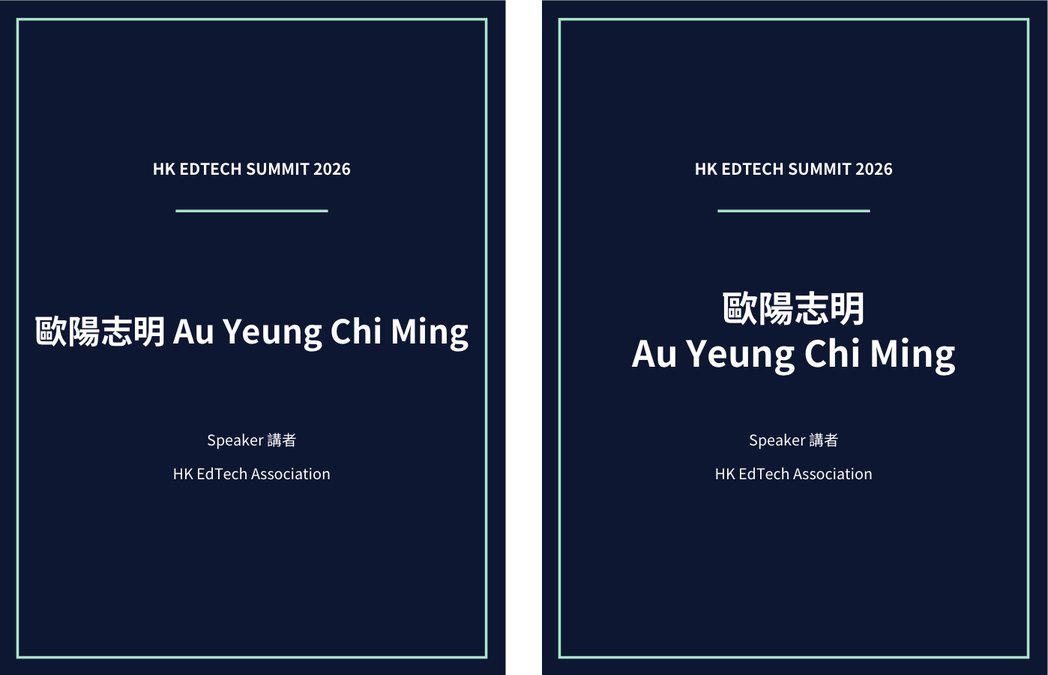
Step by step in Zavemate
- Put each name in one column Write the Chinese and English name in the same cell, in either order: “陳大文 Chan Tai Man” or “Chan Tai Man 陳大文”. If your list has them in two columns, join them in Excel with =A2&" "&B2 and fill the formula down.
- Open the tool and load the list Open the self-serve tool for name badges, sign in with your email and open your Excel or CSV file, or paste the rows. Choose which column is the name and which columns print below it, such as title or company.
- Tick “Chinese and English names on two lines” Click the name on the card, then tick the box in the toolbar above the card. The Conference badge, Wedding place card and Course certificate templates already have it on.
- Check the proof Look through the watermarked proof at actual size. Both lines of a name use the same size, which gets smaller until the longer line fits; any name shrunk below 60% of the design size is listed for you to check.
- Download and print Download the print sheet (A4 or A3, with cut lines) and one PDF per person. Print at 100% / Actual size and cut along the lines.
Which names go on two lines
A name is split when it has exactly one Chinese part and one English part. The order in your list is kept.
| In your list | On the badge |
|---|---|
| 陳大文 Chan Tai Man | 陳大文 Chan Tai Man |
| Chan Tai Man 陳大文 | Chan Tai Man 陳大文 |
| 歐陽志明 Au Yeung Chi Ming | 歐陽志明 Au Yeung Chi Ming |
| 陳大文(Peter Chan) | 陳大文 (Peter Chan) |
| 李嘉欣 | 李嘉欣 (one line) |
| Dr. 陳大文 Chan | Dr. 陳大文 Chan (one line) |
A title such as “Dr.” mixed into the name keeps it on one line. Put titles in a column of their own and print them as a separate line instead.
Tips for bilingual badges
- Fonts: the files use Noto Sans TC, an open-source font with Traditional Chinese and English, embedded in every PDF. If you choose one of the Latin fonts for the name, a line with Chinese characters still uses Noto Sans TC, so no character turns into an empty box.
- Very long names: if the proof lists a name as shrunk a lot, shorten it in the list — for example use the English given name — and make the proof again.
- Two-sided badges: a two-sided badge prints the badge twice on one strip to fold into the holder, so the name still shows when it turns on the lanyard.
- The same option is there for certificates and place cards; folded place cards print the name on both halves.
Doing it with Word mail merge
A mail merge can also put names on two lines, but it needs the Chinese and English names in separate columns and won't fit long names for you:
- Split the names into two columns (Chinese, English) in Excel.
- In Word, start a label merge for your badge size and insert the two merge fields on two separate lines.
- Use one font that has both Chinese and English (for example Noto Sans TC) for both lines, so they match and no characters go missing.
- Preview every record: long names wrap or get cut off, and their size has to be fixed by hand or in a separate merge.
- Save as PDF with the fonts embedded and open it on another computer before printing.
Questions
Can the English name go first?
Yes. The order in your list is kept: “Chan Tai Man 陳大文” prints the English line on top.
Do I need separate columns for the Chinese and English names?
No. One column like “陳大文 Chan Tai Man” is enough; the tool splits each name when you tick the box. If your list already has two columns, join them in Excel with =A2&" "&B2.
Does it work for place cards and certificates?
Yes. The same option is on the name for every product, and folded place cards show the name on both halves.
What happens to names with only Chinese or only English?
They stay on one line and are fitted like any other name, so one list can mix them.
How much does it cost?
Free until 31 December 2026: up to 300 names per account, and proofs are always free. After that, 1 credit = 1 name in the final files, with credit packs from US$9.
Try it with your own list
Watermarked proofs are free; sign in with your email to start.
Questions? Email zavemate@gmail.com